Mob Drop Editor
The Mob Drop Editor allows you to configure which mobs drop your custom items.
Accessing
- Open the item editor:
/edit gui <itemId> - Click the Mob Drops button (zombie head icon)
- The Mob Drop Editor GUI opens
Interface
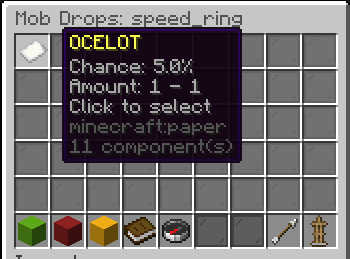
Each configured mob drop is displayed as an item showing:
- Entity type (e.g., ZOMBIE, SKELETON)
- Drop chance (0%–100%)
- Amount range (min–max)
Adding a Mob Drop
- Click Add Mob Drop
- Set each property via chat:
- Entity Type: Type the entity name (e.g.,
ZOMBIE) - Chance: Type a decimal (e.g.,
0.05for 5%) - Min Amount: Minimum items to drop
- Max Amount: Maximum items to drop
- Entity Type: Type the entity name (e.g.,
Editing a Mob Drop
- Click on an existing mob drop
- Select the property to modify
- Enter the new value in chat
Removing a Mob Drop
- Click on an existing mob drop
- Select Remove
Validation
- Entity type must be a valid living entity
- Chance must be between 0.0 and 1.0
- Min amount must be at least 1
- Max amount must be ≥ min amount